DRAFT
See entities and devices for device code conventions
Data types
We use standardized data and units so that we can compare data from different devices, sites or customers.
- We use camelCase format.
- We need to define a standard unit and unit power factor: for example all power data in W, all energy in Wh, all temperatures in C, all frequencies in Hz. The gateway has conversion routines available on server to convert data if needed?
We store standard data such as:
| type | unit | note |
|---|---|---|
| Power | W | |
| Energy | Wh | also referred to as capacity |
| Active power | VA | |
| Reactive power | VAR | |
| Voltage | V | |
| Current | A | |
| Frequency | Hz | |
| Temperature | C | |
| Relative humidity | % | |
| SOC SOH | % | State of charge or state of health (% of nominal capacity) |
| Efficiency | % | |
| Status | string or integer | camelCaseStatusString translated by EMS interface or converter to a string? |
| Position | NA | this can be the cell position in the battery pack (a pack may have up to 52 cells), or the temperature gauge id in the batteryNA |
| anount | Euro | |
| Timestamp | Unix timestamp | server or client unix timestamp. |
| Time | seconds | time interval |
gateway connection
The Site gateway (usually the site controller) is the only device connecting to EMS platform to handle
- all attributes and telemetry data
- all subscriptions and RPC commands received from EMS platform
The gateway connection is via MQTT:
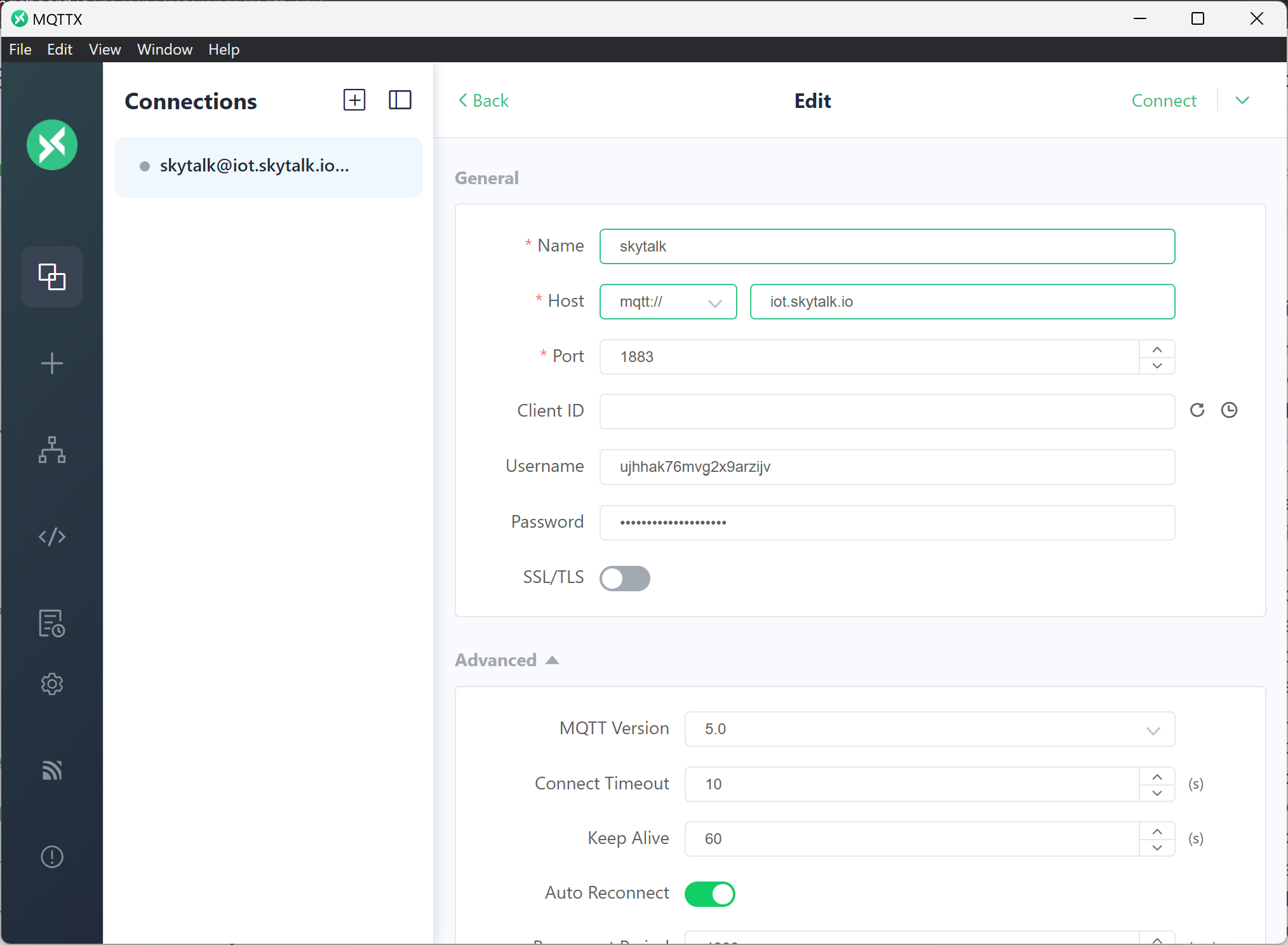
Telemetry data format - V1
We have:
- SIEMENS site controller as Modbus server which consolidates all site devices data.
- Teltonika RUTX router with 4G connection which can poll site controller registers every xx seconds and push a list of key:values to EMS platform via MQTT
V1 data map and forma
For now, the site controller has one dedicated telemetry register per device connected to site controller. This Modbus register contains a string of comma separated key,value pairs representing telemetry data for the device, prefixed with device type and timestamp. These registers are polled by teltonika router and assigned to the device name like this
{
"EE001 PV1 PC1": "inverter,1734506822436,key1,value1,key2,value2... keyN,valueN",
"EE001 ES1 BC1": "battery string,1734506838687,key1,value1,key2,value2",
"EE001 ES": "node meter,0,key1,value1,key2,value2",
...
}
The EMS platform receives this data and after parsing, it saves the telemetry data to each corresponding device.
timestamp
Timestamp can optionally be provided by site controller as second value in string, or the value is set to 0 and the server will attach server timestamp. difference is the MQTT latency plus polling interval, which is rarely meaningful.
Attributes data format - V1
coming soon, not critical
telemetry data example
NOTE: units are not required ? fixed for each data type.
Example of data for Energy storage block 1 in site EE001:
Gateway nodes data publishing
The nodes data is used by energy platforms to monitor the site total energy state and capabilities and needs to be published regularly.
This will be updated with additional site data required by energy optimizing services like Fusebox or Capalo...
power covention: TO BE CONFIRMED
- charge/consumption is positive
- discharge/production is negative NOTE: BESS is the opposite for inverter power !!!
Publishing with flat JSON syntax
//Topic: v1/devices/me/telemetry
{
  "EE001_MT_meterNode": "energyConsumptionTotal, 100000,energyProductionTotal,920000,energyConsumptionToday,190000,energyProductionToday,8000,power,-190000",
  "EE001_PV_solarNode": "energyProductionTotal,920000,energyProductionToday,8000,power,40000",
...
}
The EMS platform has a converter that will parse the value string to extract device type, timestamp
The gateway converter will convert to below EMS syntax and add timestamp:
EMS JSON syntax
[{
  "deviceName": "EE001_MT",
  "deviceType": "meterNode",
  "telemetry": [
    { "ts": 1734506822436,
    "values": {
        "energyConsumptionTotal": 100000,
        "energyProductionTotal": 920000,
        "energyConsumptionToday": 190000,
        "energyProductionToday": 8000,
        "power": -190000
        }
    }]
}, {
  "deviceName": "EE001_PV",
  "deviceType": "solarNode",
  "telemetry": [
    { "ts": 1734506838687, // set by server converter
    "values":  {
        "energyProductionTotal": 920000,
        "energyProductionToday": 80000,
        "power": 40000
      }
    }]
}
]
NOT UP TO DATE BELOW
Gateway block data publishing
blocks data can be published block by block.
BESS block(s) publishing
The energy values come from each BESS block meter. the string values come from BESS block controller.
mode for BESS are:
- 0: stopped
- 1: standby
- 2: charge
- 3: discharge
- 4: calibration
- 5: hibernate
- 6: reserved
- 7: fault - stopped
- 8: fire alarm - stopped
power: TO BE CONFIRMED:
- charge/consumption is negative
- discharge/production is positive
complete Bess block data update
Note this data representation is for convenience, the data is joined in comma separated string prefixed by device type and timestamp.
//Topic: v1/gateway/telemetry
{
  "EE001 ES1": [
    {
        "energyConsumptionTotal": 100000,
        "energyProductionTotal": 920000,
        "energyConsumptionToday": 100000,
        "energyProductionToday": 920000,
        "SOC":0.9,
        "SOH": 0.95,
        "temperatureMin": 23,
        "temperatureMax": 29,
        "power":50000,
        "mode": 2
      }
  ],
  "EE001 ES1 BC1": [
    {
        "SOC":0.9,
        "SOH": 0.965,
        "powerDC": -40000,
        "VoltageDC": 690,
        "CurrentDC": 70,
        "powerActive": 40000,
        "powerReactive": 0,
        "temperatureMin": 25,
        "temperatureMax": 28,
        "power": 40000,
        "mode": 2
      }
  ],
   "EE001 ES1 BC2": [
    {
         "SOC":0.9,
        "SOH": 0.936,
        "powerDC": -40000,
        "VoltageDC": 690,
        "CurrentDC": 70,
        "powerActive": -40000,
        "powerReactive": 0,
        "temperatureMin": 24,
        "temperatureMax": 27,
        "power": 40000,
        "mode": 2
      }
  ],
   "EE001 ES1 BC3": [
    {
        "SOC":0.9,
        "SOH": 0.963,
        "powerDC": -40000,
        "VoltageDC": 690,
        "CurrentDC": 70,
        "powerActive": 40000,
        "powerReactive": 0,
        "temperatureMin": 24,
        "temperatureMax": 29,
        "power": 40000,
        "mode": 2
      }
  ],
   "EE001 ES1 BC4": [
    {
        "SOC":0.9,
        "SOH": 0.946,
        "powerDC": -40000,
        "VoltageDC": 690,
        "CurrentDC": 70,
        "powerActive": 40000,
        "powerReactive": 0,
        "temperatureMin": 23,
        "temperatureMax": 28,
        "power": 40000,
        "mode": 2
      }
  ],
   "EE001 ES1 BC5": [
    {
         "SOC":0.9,
        "SOH": 0.968,
        "powerDC": -40000,
        "VoltageDC": 690,
        "CurrentDC": 70,
        "powerActive": 40000,
        "powerReactive": 0,
        "temperatureMin": 24,
        "temperatureMax": 28,
        "power": 40000,
        "mode": 2
      }
  ]
}